- Вход
- Product list
- Все
- Новинки
- Японские витамины
- Уход за кожей
- Зубные пасты
- Уход за телом
- Уход за волосами
-
- Личный кабинет
- История заказов
- Список избранного
- Блог
- Мейл форвардинг
- Помощь
- Доставка
- Выйти
Процедура покупки в интернет-магазине
-
ШАГ 1 - ПОИСК ТОВАРА. Откройте слева интересующую Вас товарную категорию в /ТОВАРНЫЕ КАТЕГОРИИ/ и найдите товар который Вам нужен. Для быстрого поиска можно также использовать опцию справа вверху /ПОИСК/. Если нужный товар отсутствует, то перейдите на страницу сайта /КАК ЗАКАЗАТЬ ТОВАР/.
Как узнать общую стоимость товаров и доставки? Откройте страницу товара, выберите необходимое количество, характеристики и поместите его в Корзину нажатием на кнопку /В КОРЗИНУ/. Произойдёт переход на страницу выверки содержания Корзины.
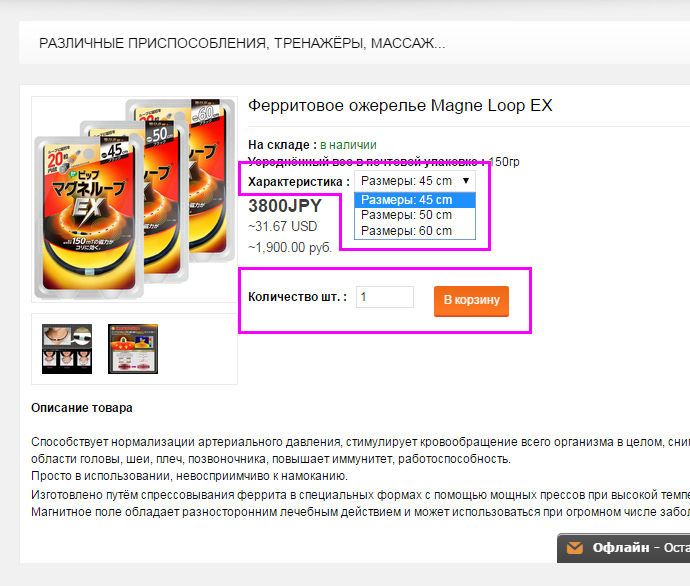
Страница выверки содержания Корзины.
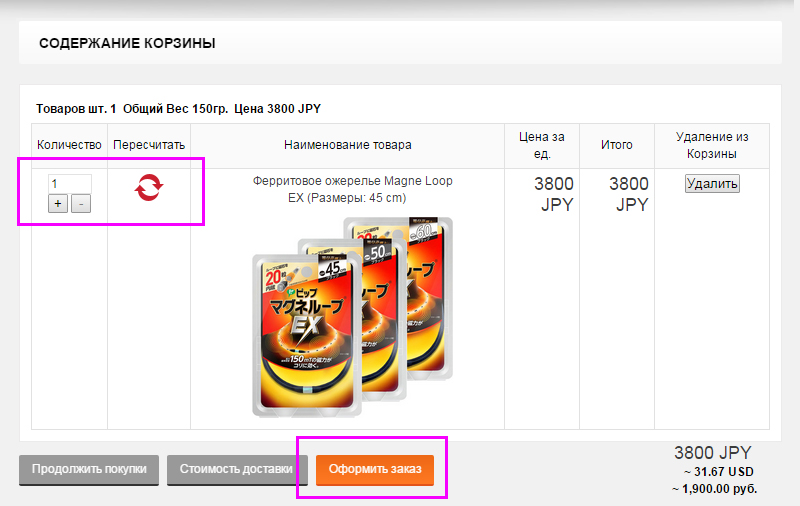
При проверке содержания Корзины можно поменять количество заказанных товаров и узнать общую их стоимость в эквиваленте трёх валют, включая российские рубли. Однако, действующей ценой является цена в японской валюте JPY( ЙЕНА) так как мы продаём Вам товар в Токио и затем высылаем его международной почтой. Рассчитать стоимость доставки из Японии можно нажатием на кнопку /СТОИМОСТЬ ДОСТАВКИ/. Пожалуйста учитывайте что стоимость доставки не зависит от города в стране, а зависит только от страны и веса посылки. Чтобы продолжить выбор товаров и пополнение Корзины – нажмите на /ПРОДОЛЖИТЬ ПОКУПКИ/.
Перед выполнение ШАГа 2 Вам необходимо зарегистрироваться на сайте.
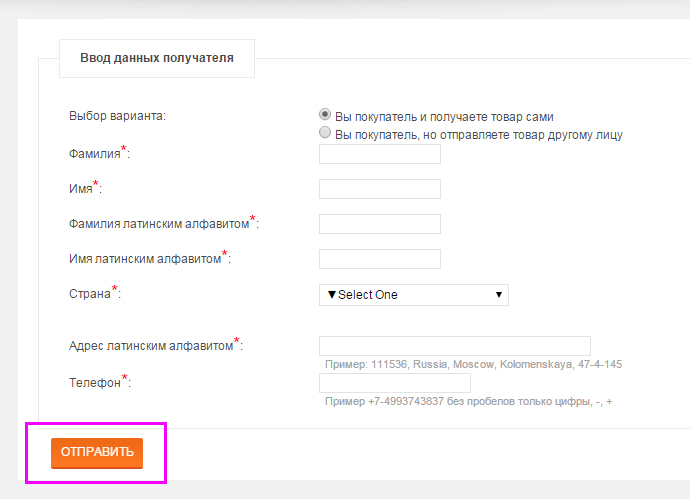
ШАГ 2 - ПОКУПКА ТОВАРА. По завершению формирования Корзины с товарами нажмите на кнопку /ОФОРМИТЬ ЗАКАЗ/ чтобы перейти к регистрации покупки и проведению оплаты. В появившейся странице с Вашими персональными данными Вы можете ввести данные получателя. Это предусмотрено на случай если Вы отправляете товар не себе, а другому лицу в подарок и т. п.. Для продолжения оформления нажмите кнопку /ОТПРАВИТЬ/.
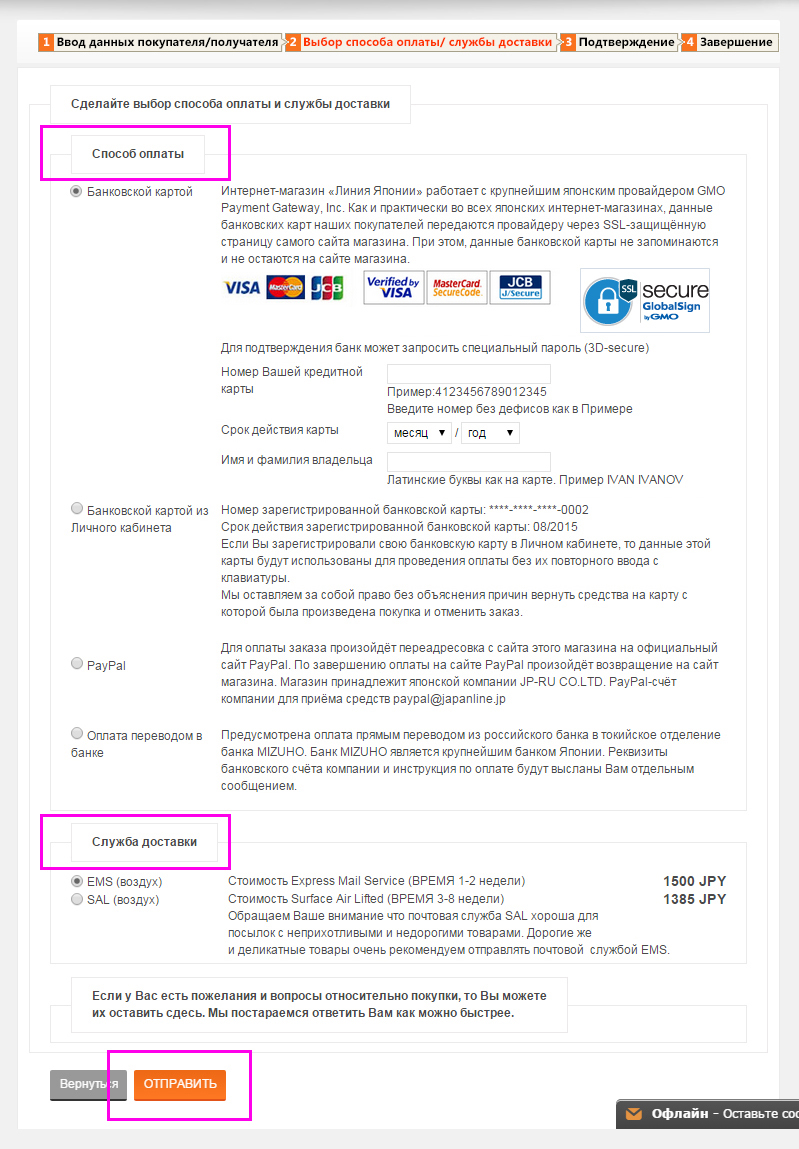
На следующей странице выберите способ оплаты и службу доставки. При выборе способа оплаты Банковской картой введите её номер и срок действия. Нажмите на кнопку /ОТПРАВИТЬ/.
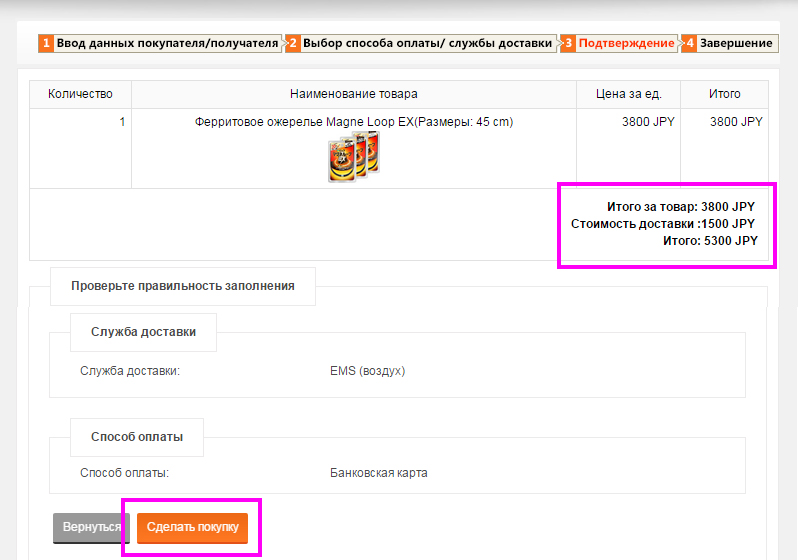
На появившейся странице Вы увидите общую стоимость товаров в заказе и стоимость доставки всего заказа в Ваш адрес одной посылкой. При нажатии на кнопку /Сделать покупку/ происходит её автоматическая регистрация в Вашем Личном Кабинете и на Ваш электронный ящик также автоматически отправляется сообщение с подробностями о Вашей покупке.
Если Вами был выбран способ оплаты Банковской картой, то нажатием на кнопку /Сделать покупку/ происходит также оплата и автоматический переход на страницу сайта завершающую оформление заказа.
Страница завершения оформления заказа.
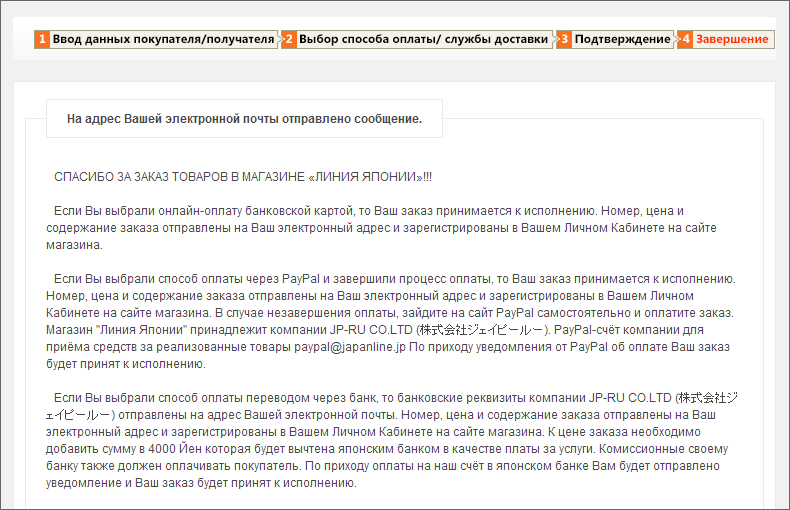
Если Вами был выбран способ оплаты PayPal, то Вы автоматически покидаете сайт магазина и переадресовываетесь на сайт PayPal для проведения оплаты. По завершению оплаты на сайте PayPal Вы автоматически возвращаетесь на страницу завершения оформления заказа.
Если Вами был выбрана Оплата переводом в банке, то Вы автоматически переходите на страницу завершения оформления заказа. Для оплаты заказа необходимо посетить свой банк и сделать перевод на счёт в банке Японии.
Для прояснение остальных деталей оплаты перейдите, пожалуйста, на страницу ОПЛАТА сайта магазина.
Прямая онлайн-оплата банковской картой на сайте нашего магазина.
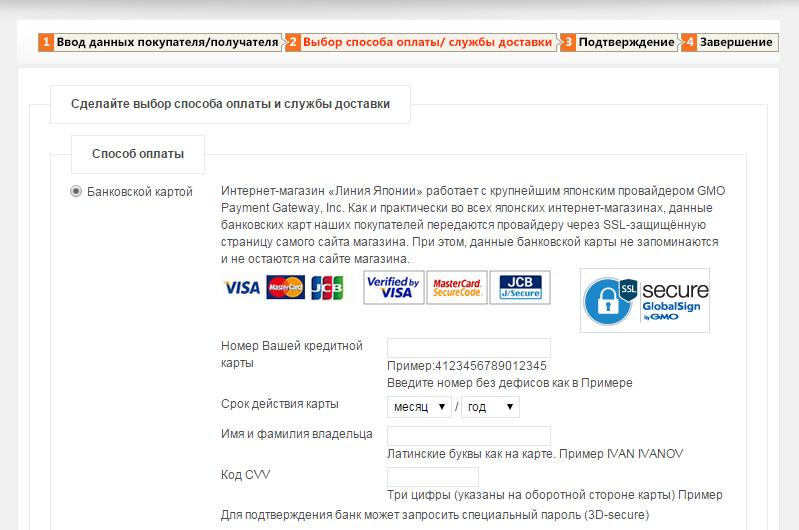
и введите следующие данные:
- номер карты
- срок действия карты
- Имя и Фамилия как на карте
- код CVV, имеющийся на обороте карты.(Код CVV перестал применяться после введения современной технологии безопасности 3D-secure. На Ваш телефон Ваш банк высылает разовый код который нужно будет сразу же ввести в появившееся окно Вашего же банка.)
Пример с введёнными данными карты здесь:

После ввода данных своей карты внизу этой же страницы укажите службу доставки которая Вас устраивает:

и нажмите кнопку /ОТПРАВИТЬ/.
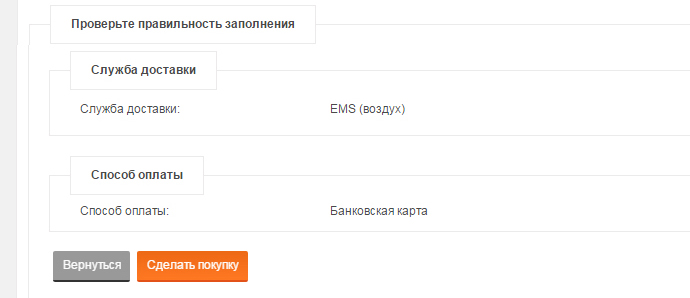
Для уточнения и проверки появиться новая страница с полной информацией о Вашем заказе. Если всё верно и исправления не требуются, то внизу этой страницы нажмите на кнопку /СДЕЛАТЬ ПОКУПКУ/ и произойдёт старт процесса оплаты.
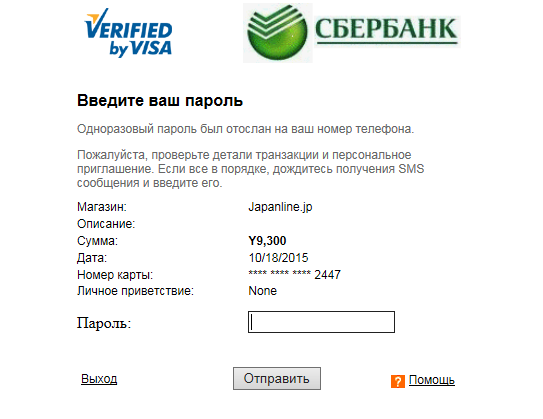
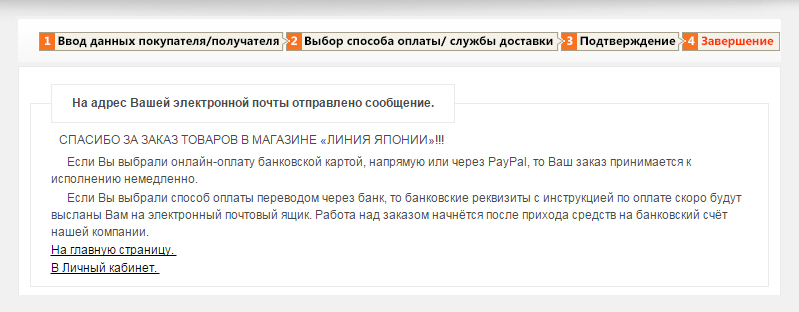
В действии современная технология безопасности платежей 3D-secure! Вам будет предложено ввести код посланный Вам из Вашего же банка на телефон. Для введения этого кода появиться специальная страница Вашего банка. В случае Сбербанка пример приведён немного внизу. Таким образом Ваш банк проверяет что Вы, это именно Вы и никто другой. После получения согласия от Вашего банка, на сайте нашего магазина появляется страница сообщающая о завершении процесса оплаты. Пример приведён внизу:
После нажатия на /СДЕЛАТЬ ПОКУПКУ/ и до появления завершающей страницы, весь процесс занимает всего несколько минут. Убедиться в шифровании связи с GMO Payment Gateway, Inc. можно по наличию небольшого знака в форме замка справа от адресной строки веб-страницы. Кроме того, обычное «http://» заменяется на «https://» в самом веб-адресе.
Номер, цена и содержание покупки в Японии немедленно отправляются на Ваш электронный почтовый ящик и одновременно регистрируются в Вашем Личном Кабинете на сайте магазина. С этого момента мы приступаем к выполнению заказа сделанного и оплаченного Вами. В случае обнаружения ошибки после проведения оплаты сообщите нам, и оплата будет нами отменена. ПРОЦЕСС ОТМЕНЫ ОПЛАТЫ ОЧЕНЬ ПРОСТ.
В случае отрицательного ответа, Вы увидите страницу для повторного ввода данных своей карты на случай допущения Вами ошибки при их вводе:
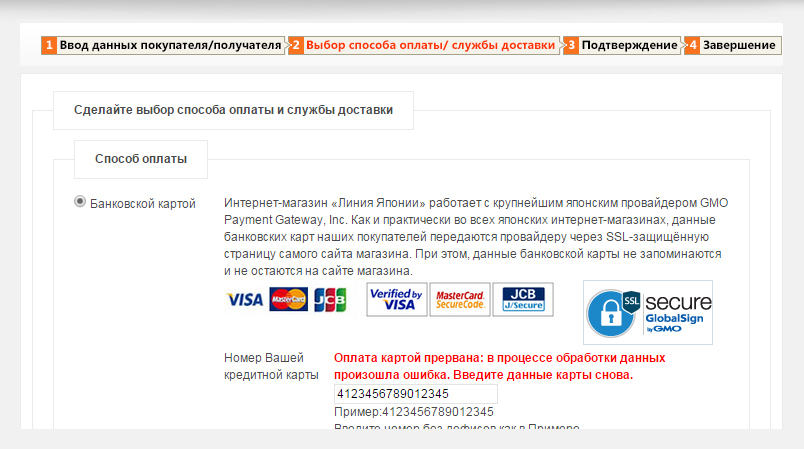
Если данные карты введены правильно, но страница для повторного ввода появляется снова и снова, то возможны следующие причины:
1. Вы превысили предел стоимости покупок установленный Вашим банком на текущий период;
2. Ваш банк не оказывает Вам услугу по оплате через интернет Вашей картой.
3. Ваш банк требует наличия CVV кода в данных пришедших из Японии. Однако, японский провайдер, или банк, не обработали этот код, считая что современной технологии безопасности 3D-secure достаточно в данном конкретном случае.
В этих и других случаях, следует обратиться в свой банк за консультацией. Если Ваш банк применяет технологию 3D-secure, то рекомендуем Вам попросить свой банк об отказе от применения CVV кода для Вашей карты. Это исключит возможные трудности в оплате и нисколько не понизит уровень безопасности.
Для покупателей предполагающих частые покупки в Японии предусмотрена возможность регистрации данных своей карты на сайте магазина в "Личном кабинете". При каждой новой покупке эти данные будут передаваться GMO Payment Gateway без их ввода с клавиатуры. Подобная услуга предлагается практически всеми современными интернет-магазинами в Японии и, соответственно, реализована и в нашем магазине.
Вся информация оставленная покупателем в "Личном кабинете" защищена и может быть полностью удалена в любое время самим покупателем. Сервер магазина физически находится в Японии.
Оплата покупки в Японии банковской картой через PayPal
Магазин JapanLine.Jp имеет счёт зарегистрированный японским отделением PayPal на юридическое лицо в Японии. Перед проведением оплаты необходимо выбрать товары и поместить их в условную «Корзину», как и в случае оплаты картой онлайн. Размер оплаты рассчитывается на сайте автоматически посредством суммирования цен всех товаров в «Корзине» с добавлением стоимости доставки из Японии.
Вся процедура оформления заказа на сайте магазина завершается нажатием кнопки /Сделать покупку/, но это не означает что происходит оплата.
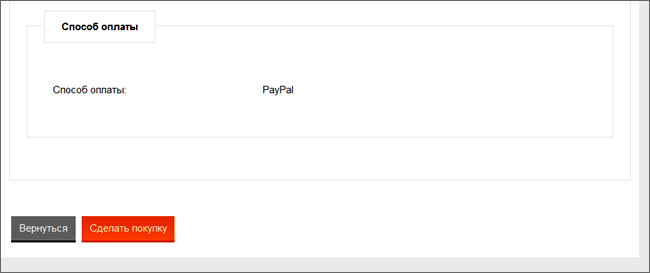
Происходит же Ваша переадресация на официальный сайт PayPal, где Вам и будет предложено оплатить покупку.
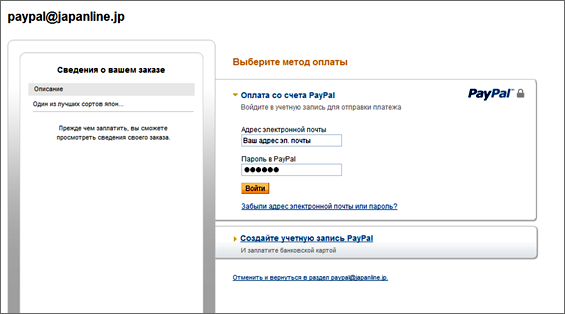
Введя свои PayPal-данные покупатель переходит на следующую страницу сайта PayPal нажатием кнопки /Войти/.
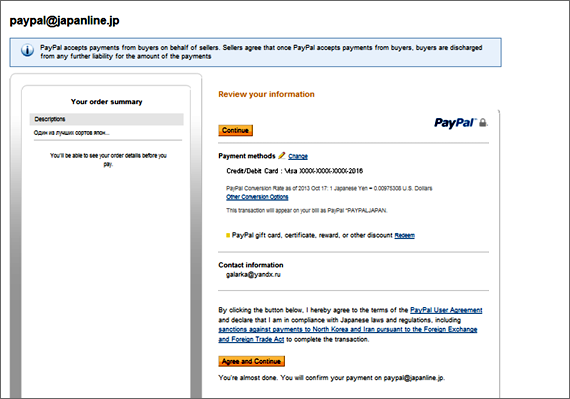
Далее, нажатием нижней кнопки /Agree and Continue/ покупатель производит оплату как таковую. После нажатия на эту кнопку нужно обязательно дождаться автоматического возвращения на сайт магазина. Номер, цена и содержание покупки в Японии немедленно отправляются на Ваш электронный почтовый ящик и регистрируются в Вашем Личном Кабинете на сайте магазина. При оплате через PayPal, Вы оплачиваете банковской картой этой компании. Затем, PayPal переводит средства на наш счёт в японском банке в Токио.
Оплата переводом на счёт юрлица нашей компании в японском банке
Как и при расчете картой, размер оплаты рассчитывается на сайте посредством суммирования цен всех товаров в «Корзине». К полученной сумме добавляется стоимость доставки из Японии. Номер счёта в японском банке MIZUHO для оплаты товаров прямым переводом будет выслан на Ваш электронный почтовый ящик после оформления покупки. Номер, цену в ЙЕНАХ и содержание заказа в Японии уточняйте перед оплатой в своём электронном почтовом ящике или же Личном Кабинете на сайте магазина. ПРИ ОФОРМЛЕНИИ ПЕРЕВОДА В СВОЁМ БАНКЕ УКАЖИТЕ НОМЕР ЗАКАЗА!!! ПЕРЕВОД ДОЛЖЕН БЫТЬ СДЕЛАН В ЯПОНСКИХ ЙЕНАХ!!! В качестве получателя платежа указывайте ТОЛЬКО нашу компанию JPRU CO LTD без указания каких-либо имён наших работников. Оплата предназначается юрлицу компании, а не частному лицу.
На сайте мы указываем цену товара подразумевая что оплата будет производится банковской картой напрямую или через PayPal. Это относится как к японской косметике так и ко всем другим товарам, без исключения. Стоимость же перемещения средств банковским переводом обходится дороже и имеет нижний предел в 3500 йен. Эту сумму снимет с нас наш японский банк. Таким образом, к сумме показанной при оформлении заказа Вам необходимо будет сделать добавление при проведении перевода в банке. Величина добавления составит от 4000JPY и будет сообщена Вам отдельно в электронном письме вместе с номером нашего счёта в японском банке. Кроме того, Вам нужно будет не забыть оплатить услуги своего банка откуда Вы делаете перевод.
Таким образом, приобретать недорогие товары посредством банковского перевода не имеет смысла. Например, оплатив за товар 600 йен нужно будет доплатить 4000 йен за услуги нашего банка и ещё дополнительно за услуги своего банка. Банковский перевод, как средство оплаты, оптимален при покупке стоимостью от ста тысячь йен и выше. При покупке ниже этой суммы МЫ МОЖЕМ ОТКАЗАТЬСЯ ОТ ВЫПОЛНЕНИЯ ЗАКАЗА по причине наличия стоимости рабочего времени которое будет затрачено на взаимодействие с банком в связи с Вашим переводом.